Dynamic VM Runners
Setting Up Dynamic VM Runners
This section is based on this blog article. It's about how to use the GitLab Custom Executor to spawn KVM VMs on demand and run jobs on them. It should work for any VM provider. The code is in this repository. You'll see that it uses some shell scripts to launch the VMs and then connects to the VMs over SSH to run the commands. There is no reason the shell scripts couldn't me modified to use another VM provider or some cloud provider.
Here is a diagram of the overall architecture that may be helpful.
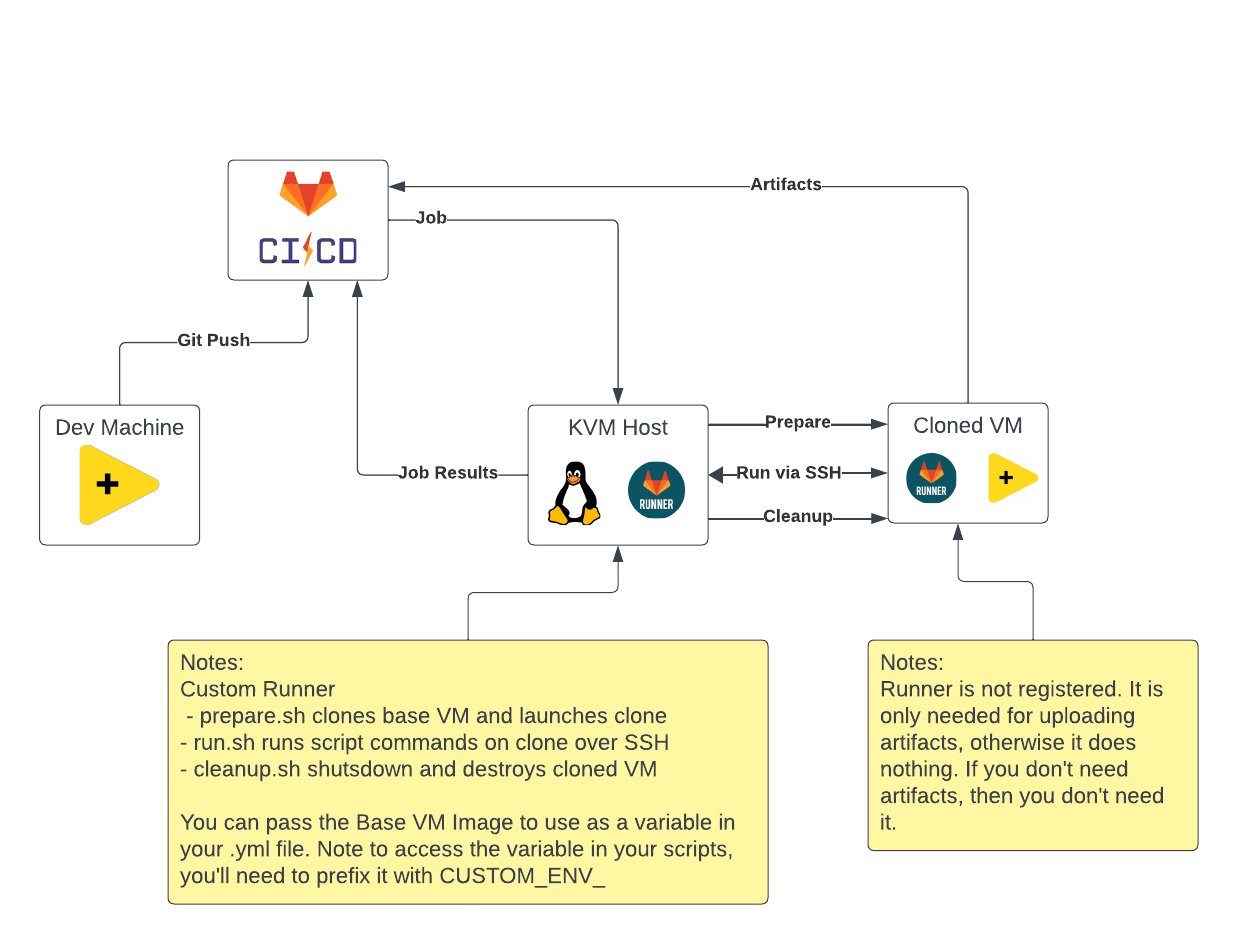
NOTE This is an advanced topic so I assume you have some idea of what you are doing. I make some assumptions and leave some details out.
Disadvantages
- The main disadvantage of this approach is it is slightly more complex
- As-is the scripts only work with GitLab and KVM on Linux. It should be portable to other platforms. For GitHub, I looked into it and there is a webhook that fires when a new job is queued. So that could be used to execute a shell script to start a VM and register it with GitHub as an ephemeral runner. If you get that to work, let me know.
Advantages
This approach offers several advantages.
- Clean VM each time - avoid residue being left over from one job to the next. Ensures you have included all dependencies.
- Scaling and Running in Parallel - This allows you to run multiple different (or same) VMs in parallel.
- Ease of setting up New Base VMs
- Better Resource Utilization - If you have several projects, you only have 1 runner listening.
Setting Up The Host
I use KVM on Linux. Google how to set that up. Then I clone these scripts and place them somewhere accessible by the user that runs KVM. You also need a directory full of Base VMs and a directory for clones. Putting all clones in one directory makes housekeeping easier if something get's orphaned. Getting the permissions right can be a challenge. I suggest starting with a project with a really simple hello world and getting that to work first. Also you'll need to setup an SSH key to ssh into the VMs without a password - so don't make the key password protected!
Setting Up The Base VM Images
This is for Windows machines. I generally install Git For Windows and NIPM. Then I set up SSH and everything else. Then I clone that VM and install LabVIEW and VIPM. That gives me 2 base VMs. One with just Git and NIPM so I can test installs and one with LabVIEW, VIPM, etc for running my builds.
Windows SSH
You need to setup SSH server on your Windows VM. See this blog article
Necessary Packages For BootStrapping
You'll need the G-CLI, VIPM API and the VIPC Applier packages as a minimum. With that you can use the VIPC Applier to install anything else you need. Remember this happens on every job. If it starts taking too long, you can create a seperate image for a particular project with the vipc preinstalled. I usually keep the VIPC step in that case anyway, just incase I change something like add or upgrade a package.
GitLab Runner
You only technically need GitLab Runner on the KVM host. However if you want to upload artifacts then you need gitlab-runner on the base VM and in the path. You don't register it, but it does have to be in the path.
Setting Up The gitlab-ci.yml File
You have 2 things that you need to add to your yml file in order to run a job this way. First you need a tag to tell GitLab which runner to dispatch the job to. I use "kvm" for this. You also need a $BASE_VM variable to tell the runner which VM to spin up and run the job on.
Parallel Jobs
You can enable parallel jobs by editing the runner config on the KVM host. Just change the concurrent setting.